Watermark PDF

Add a watermark to PDF pages

Place text like CONFIDENTIAL, DRAFT, or your brand name on every page without uploading the document.

Watermark PDF
Your files stay in this browser. Nothing is uploaded to a server.
Add Watermark to PDF Online Free

Add text watermark

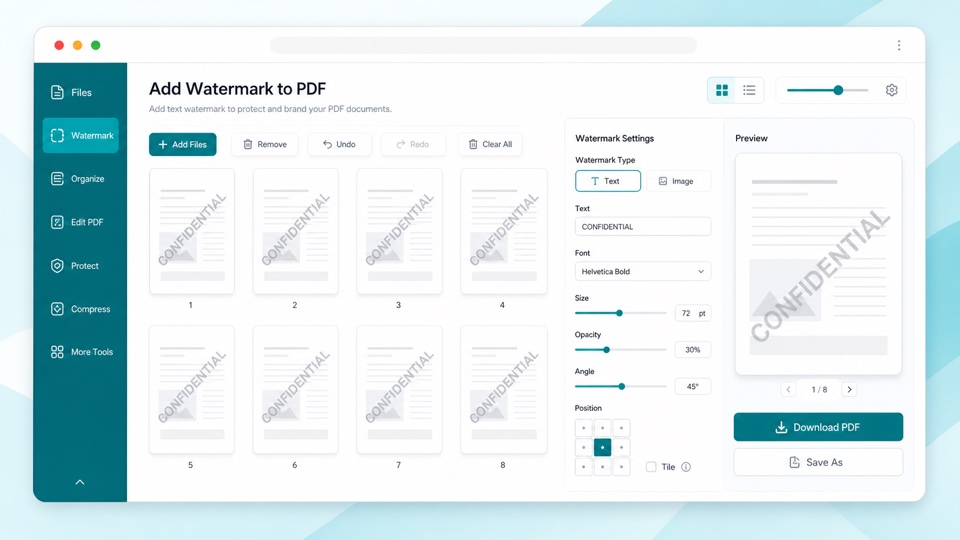
Enter watermark text, adjust opacity, size, and angle, then download a new PDF.

Drop PDF files here

Your files stay in this browser. Nothing is uploaded to a server.

Watermark PDF files without uploading them

A PDF watermark makes it clear that a document is confidential, a draft, an internal copy, or part of a review workflow. This tool adds the watermark to every page and creates a new downloadable PDF.

You can set the watermark text, adjust transparency, choose a readable size, and angle the mark across the page. The thumbnail preview helps you check the overall placement before creating the final file.

The process runs in the browser, so the PDF does not need to be uploaded just to add a simple text watermark.

How watermarking works

Every page

The same text watermark is applied to all pages in the PDF.

Adjustable style

Control opacity, font size, and angle to make the watermark subtle or obvious.

Private browser workflow

The PDF is processed locally in your browser and downloaded as a new file.

How it works

1

Upload your PDF

Preview the pages locally in your browser.

2

Set watermark text

Type the text and tune opacity, size, and angle.

3

Download the PDF

A new watermarked PDF is generated on your device.

Questions

Can I add a watermark without uploading my PDF?+

Yes. The watermark is added in your browser and the file stays on your device.

Does the watermark appear on every page?+

Yes. The same text watermark is applied to each page in the document.

Can I change the opacity?+

Yes. Use the opacity control to make the watermark lighter or stronger.

Can I add an image watermark?+

This version supports text watermarks. Image watermarks can be added as a future advanced option.

Will the original PDF be changed?+

No. The tool creates a new watermarked PDF and leaves the original file untouched.