Crop PDF

Crop PDF pages in your browser

Trim page margins, remove white borders, and create a cleaner PDF without sending the file to a server.

Crop PDF
Your files stay in this browser. Nothing is uploaded to a server.
Crop PDF Online Free

Crop page margins

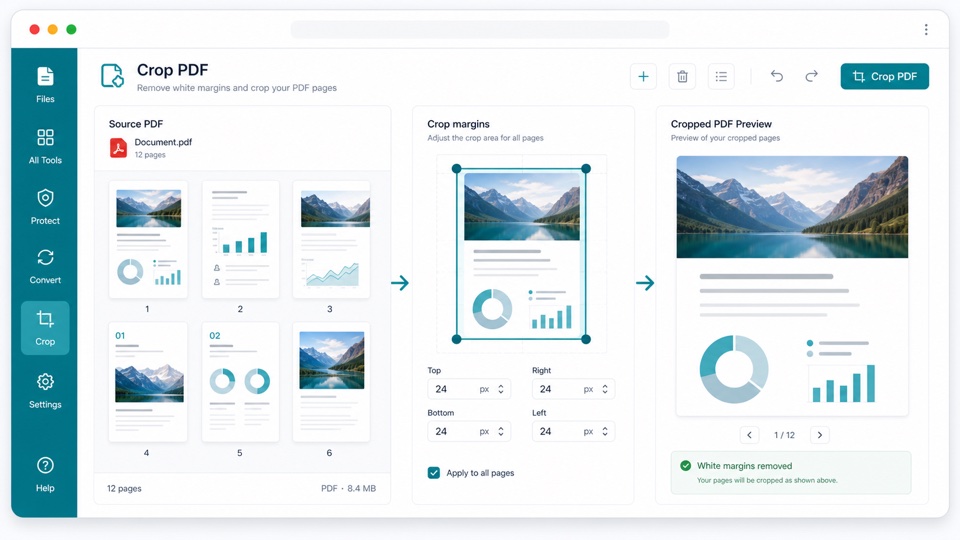
Enter top, right, bottom, and left margins to crop every page, then download a new PDF.

Drop PDF files here

Your files stay in this browser. Nothing is uploaded to a server.

Crop PDF margins without uploading files

PDF cropping helps clean up scanned pages, remove extra whitespace, and focus the visible page area on the content that matters.

Set margin values for each side of the page. The preview highlights the area that will remain before you create the cropped PDF.

The crop is applied locally in the browser by updating the PDF page crop boxes. Your original PDF is not modified.

How PDF cropping works

Margin controls

Set top, right, bottom, and left crop values in PDF points.

Non-destructive copy

A new cropped PDF is generated while the original file remains unchanged.

Private browser workflow

The PDF is processed locally in your browser.

How it works

1

Upload your PDF

Preview the pages in the browser.

2

Set crop margins

Enter the amount to trim from each side.

3

Download the cropped PDF

Create a new PDF with adjusted page crop boxes.

Questions

Can I crop a PDF without uploading it?+

Yes. Cropping happens in your browser and the file stays on your device.

What units do the margin fields use?+

The fields use PDF points. Increase a value to trim more from that side.

Does cropping delete hidden content?+

This tool updates the visible crop box. It is intended for layout cleanup, not secure redaction.

Can I crop all pages at once?+

Yes. The same crop margins are applied to every page.

Will the original PDF be changed?+

No. The tool creates a new cropped PDF and leaves the original file untouched.