Rotate PDF

Rotate PDF pages online

Fix sideways or upside-down pages, preview every page, and download a permanently rotated PDF in seconds.

Rotate PDF
Your files stay in this browser. Nothing is uploaded to a server.
Rotate PDF Online Free - Rotate Pages Permanently

Rotate pages

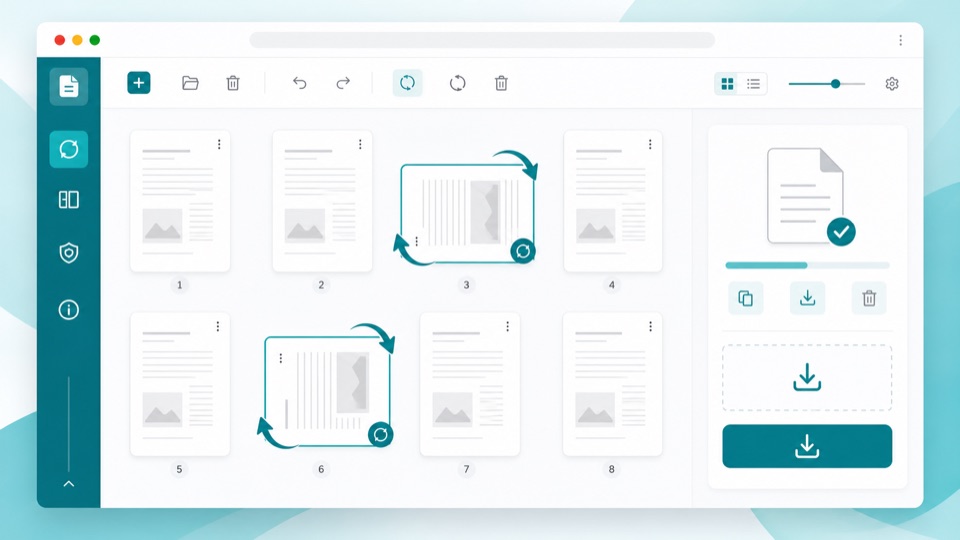
Select pages, choose a rotation, then download the corrected PDF.

Drop PDF files here

Your files stay in this browser. Nothing is uploaded to a server.

Rotate PDF pages without uploading files

A PDF often looks fine until one scanned page appears sideways, a landscape table opens in the wrong direction, or a signed page is upside down. This Rotate PDF tool lets you correct those pages in the browser and save a new document that keeps the fixed orientation.

You can rotate every page at once or select individual pages from the thumbnail grid. The result is useful for scanned contracts, homework packets, invoices, forms, reports, manuals, and any PDF where only a few pages need a different direction.

The tool updates the page rotation in the PDF instead of turning pages into flat images. That keeps text, vectors, and embedded page content as close to the original as possible while making the corrected direction permanent in common PDF viewers.

What happens to your PDF

Browser-only processing

Your PDF is read and saved locally in the browser. The file does not need to be uploaded to a server.

Permanent orientation

The downloaded PDF stores the new page direction so it opens correctly in other PDF readers.

No raster conversion

Pages are not converted into screenshots, so text and vector content remain intact whenever the source PDF supports it.

How it works

1

Upload your PDF

Drag in a PDF and the page previews are created locally in your browser.

2

Rotate selected pages

Rotate one page, multiple pages, or the whole document left, right, or 180 degrees.

3

Download the fixed file

The saved PDF keeps the new page orientation when opened in any viewer.

Questions

Can I rotate just one page in a PDF?+

Yes. Select any page thumbnail, rotate it, and download a new PDF with only that page changed.

Are my files uploaded?+

No. Rotation runs in your browser, so the PDF does not need to leave your device.

Does rotation reduce PDF quality?+

No. The tool updates page orientation metadata and keeps the original page content intact.

Can I rotate all pages at once?+

Yes. Use Select all, choose left, right, or 180 degrees, then create the corrected PDF.

Will the original file be changed?+

No. The browser creates a new downloadable PDF and leaves the original file on your device untouched.