Split PDF by Ranges

Split PDF by custom ranges

Create separate PDFs from specific page ranges without uploading your document.

Split by Ranges
Your files stay in this browser. Nothing is uploaded to a server.
Split PDF by Page Ranges Online Free

Split by page ranges

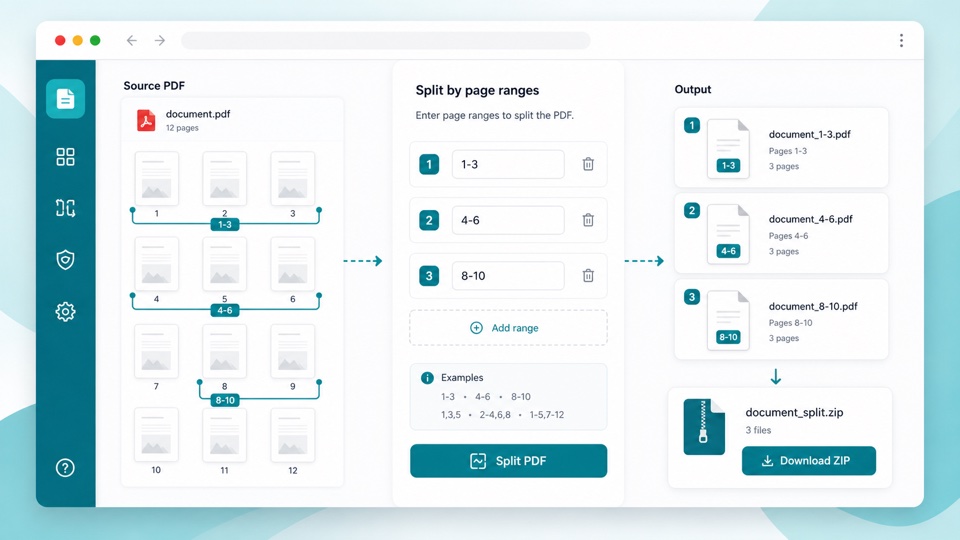
Enter one or more page ranges, preview the document, and download the split files as a ZIP.

Drop PDF files here

Your files stay in this browser. Nothing is uploaded to a server.

Split one PDF into custom page-range files

Page-range splitting is useful when a long PDF contains several sections that need to become separate files. Instead of exporting every page individually, you choose the ranges you want.

Use commas to keep pages together in one output file, and use semicolons or new lines to create multiple output PDFs. For example, 1-3, 5; 6-8 creates two files.

The split happens in the browser, so your PDF does not need to be uploaded just to create the range files.

How custom ranges work

Flexible syntax

Use ranges like 1-3, single pages like 5, and multiple groups separated by semicolons.

ZIP output

Each range group becomes a PDF, and all generated files are bundled into one ZIP.

Private browser workflow

Page previews and range exports are created locally in your browser.

How it works

1

Upload your PDF

Preview the pages so you can confirm the page numbers.

2

Enter ranges

Type ranges such as 1-3, 5; 6-8. Each semicolon or new line creates another output PDF.

3

Download ZIP

The selected ranges are saved as separate PDFs inside one ZIP file.

Questions

How do I split one PDF into multiple page ranges?+

Enter each output group separated by semicolons or new lines, such as 1-3; 4-6; 7-10.

Can one output PDF include non-consecutive pages?+

Yes. Use commas inside one group, such as 1-3, 8, 10.

Are page numbers one-based?+

Yes. Page 1 means the first page shown in the preview grid.

Why is the result a ZIP file?+

Splitting by ranges can create several PDFs, so they are bundled into one ZIP download.

Is my PDF uploaded?+

No. The split is processed in your browser.