N-up PDF Layout

Put multiple PDF pages on one sheet

Arrange 2 or 4 original pages on each A4 or Letter sheet for compact printing without uploading your PDF.

Pages Per Sheet
Your files stay in this browser. Nothing is uploaded to a server.
Multiple PDF Pages Per Sheet Online Free

Create a pages-per-sheet PDF

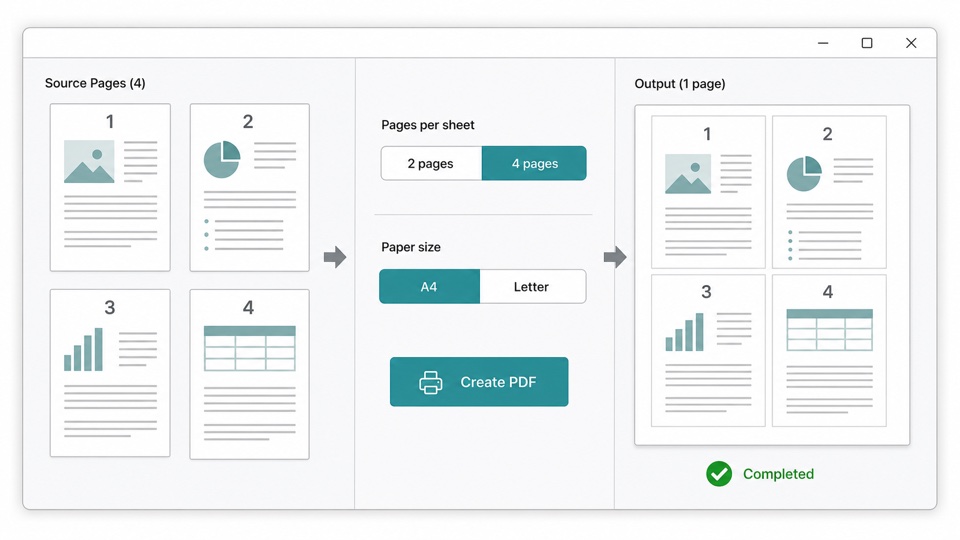
Choose a 2-page or 4-page layout and an output paper size, then create a print-ready PDF.

Drop PDF files here

Your files stay in this browser. Nothing is uploaded to a server.

Print more PDF pages on fewer sheets

Pages-per-sheet layout is useful for handouts, draft reviews, lecture notes, and documents that do not need one full sheet per page.

Choose two pages on a landscape sheet or four pages in a portrait 2 by 2 grid. A light border separates each original page.

The browser embeds and scales the original PDF pages directly, so vector graphics and searchable text remain available in the output.

How the layout is created

Vector page embedding

Source pages are scaled as PDF content instead of being converted to screenshots.

Predictable reading order

Pages flow left to right and then top to bottom on four-page sheets.

Standard paper sizes

Output sheets use A4 or US Letter dimensions for straightforward printing.

How it works

1

Choose a PDF

Open the document locally and review its page previews.

2

Choose a layout

Select 2 or 4 pages per sheet and choose A4 or Letter paper.

3

Download the new PDF

Create and save the compact print-ready document.

Questions

Is my PDF uploaded to a server?+

No. Page layout and PDF creation happen locally in your browser.

What is the page order?+

Pages are placed left to right. Four-page sheets continue from the top row to the bottom row.

Will text remain searchable?+

Yes, when the source text is searchable. Original pages are embedded as PDF content.

Which paper sizes are supported?+

The tool supports A4 and US Letter output sheets.

What happens when the last sheet is not full?+

Remaining pages are placed in order and unused cells stay blank.