Flatten PDF

Flatten PDF pages into fixed visuals

Lock the visible appearance of a PDF by rasterizing each page locally in your browser.

Flatten PDF
Your files stay in this browser. Nothing is uploaded to a server.
Flatten PDF Online Free

Flatten PDF

Upload a PDF, flatten the visible pages, and download a new fixed-layout copy.

Drop PDF files here

Your files stay in this browser. Nothing is uploaded to a server.

Flatten PDFs without uploading documents

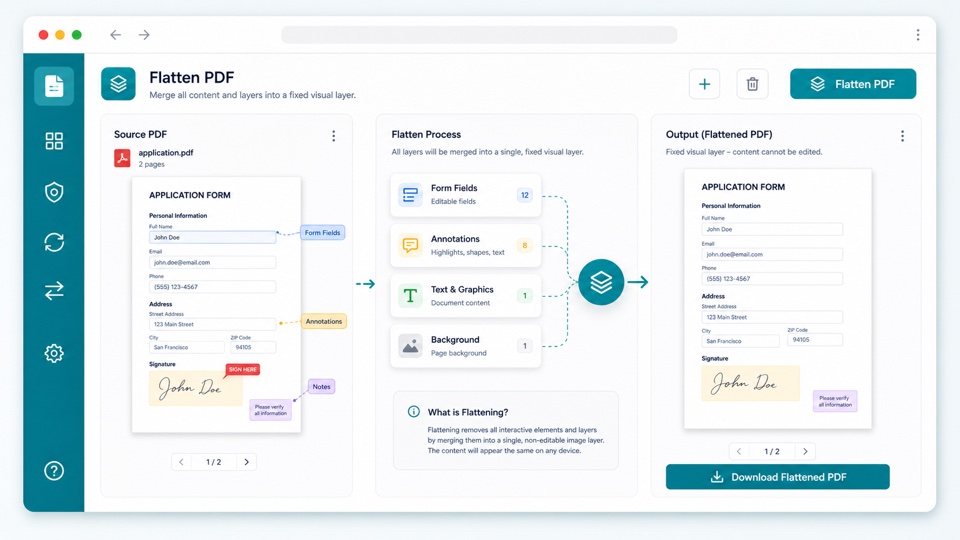
Flattening turns each visible PDF page into a fixed image layer. This can help preserve the visual appearance of annotations, form fields, and edits.

The output PDF keeps the page layout but no longer preserves selectable text or editable vector objects in the same way as the original.

The process runs in your browser, so private documents do not need to leave your device.

How PDF flattening works

Rasterized pages

Each page is rendered and embedded back into a new PDF.

Fixed appearance

The visible layout is preserved as an image-based page.

Private workflow

The PDF is processed in your browser and downloaded as a new file.

How it works

1

Upload your PDF

Preview the pages locally in your browser.

2

Flatten pages

The tool renders each page and rebuilds the document.

3

Download the flattened PDF

Save a fixed visual copy of the original file.

Questions

Can I flatten a PDF without uploading it?+

Yes. The PDF is processed locally in your browser.

Will text remain selectable?+

No. Flattening rasterizes pages, so text becomes part of the page image.

Does flattening secure sensitive information?+

No. It helps fix the visible appearance, but it is not a secure redaction tool.

Will file size change?+

It may increase or decrease depending on the original PDF and page content.

Will the original PDF be changed?+

No. The tool creates a new flattened PDF and leaves the original file untouched.