Extract PDF Pages

Extract selected PDF pages

Pick the pages you need and download them as a separate PDF without uploading the document.

Extract Pages
Your files stay in this browser. Nothing is uploaded to a server.
Extract PDF Pages Online Free

Extract pages

Select one or more pages to copy into a new PDF.

Drop PDF files here

Your files stay in this browser. Nothing is uploaded to a server.

Extract only the PDF pages you need

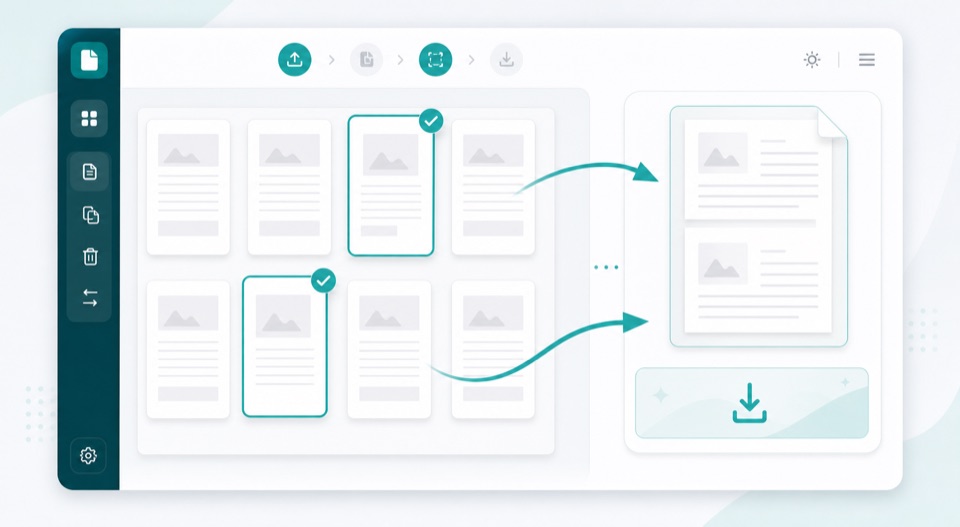
Extracting PDF pages is the fastest way to create a smaller document from selected pages while leaving the original file untouched. Choose the pages you want, create a new PDF, and download it from the browser.

This is useful when a long report contains one chapter to share, a contract includes only a few pages that need review, or a scanned packet has specific pages that belong in a separate file. You can select one page, several consecutive pages, or non-consecutive pages.

Unlike splitting, extraction creates one new PDF containing the pages you selected. It is meant for focused page selection rather than turning every page into a separate file.

How selected pages are saved

One new PDF

All selected pages are copied into a single output PDF.

Original order

Selected pages are saved in their existing page order so the document remains easy to follow.

Private browser workflow

Page previews and output generation happen locally in the browser.

How it works

1

Upload your PDF

Preview every page locally in your browser.

2

Select pages

Choose the pages you want to keep in the new file.

3

Download the result

The selected pages are saved as one separate PDF.

Questions

Can I extract non-consecutive pages?+

Yes. Select any combination of pages and they will be copied in page order.

Is this different from split PDF?+

Yes. Extract creates one PDF from selected pages, while split creates separate page files.

Can I extract one page?+

Yes. Select a single page and download it as its own PDF.

Can I choose pages that are not next to each other?+

Yes. Select any thumbnails you need and the output PDF will include those pages.

Will the original PDF be shortened?+

No. Extraction creates a new PDF and does not modify the original file.