PDF Privacy

Remove metadata from PDF files

Clear hidden document properties before sharing a PDF. The file stays in your browser and page content remains unchanged.

Remove Metadata
Your files stay in this browser. Nothing is uploaded to a server.
Remove PDF Metadata Online Free

Clean PDF metadata

Choose a PDF, review its pages, and create a clean copy without standard document metadata.

Drop PDF files here

Your files stay in this browser. Nothing is uploaded to a server.

Remove hidden PDF properties before sharing

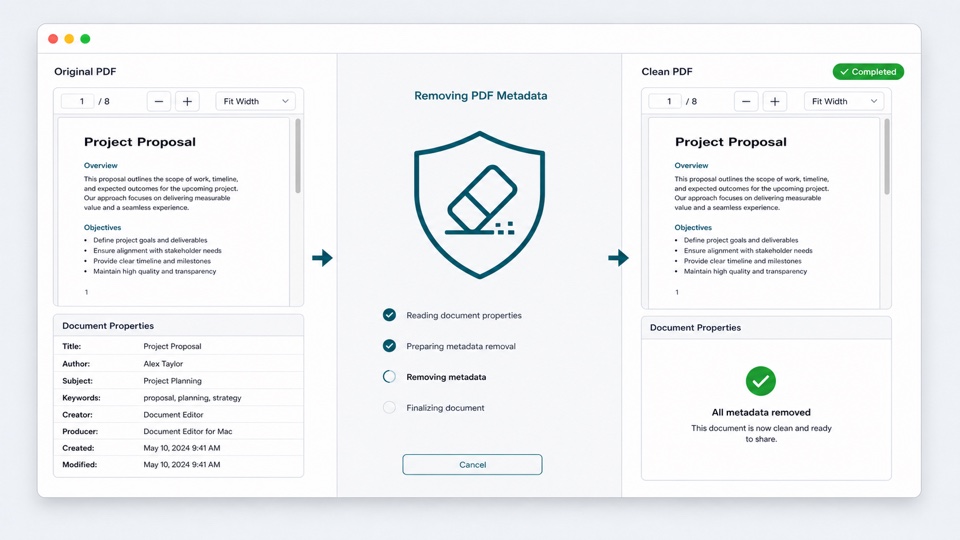
PDF files can contain a title, author name, subject, keywords, creator application, creation dates, and other properties that are not visible on the page.

This tool removes the standard PDF information dictionary and embedded XMP metadata stream while preserving the document pages.

Everything runs locally in your browser. The original file is never modified or uploaded to a processing server.

What the cleaner removes

Document properties

Removes the standard title, author, subject, keywords, creator, producer, and date fields.

Embedded XMP metadata

Removes the catalog metadata stream commonly used by document and design applications.

Original page quality

Page content is preserved without rasterizing or recompressing the document.

How it works

1

Choose a PDF

Open the file locally and preview its pages.

2

Remove metadata

Create a copy without standard document properties or XMP metadata.

3

Download the clean PDF

Save the cleaned copy while keeping the original file unchanged.

Questions

Is my PDF uploaded to a server?+

No. The file is read and cleaned locally in your browser.

Which metadata fields are removed?+

The tool removes the PDF information dictionary and the embedded XMP metadata stream, including common title, author, keyword, creator, producer, and date properties.

Does this remove visible names from the pages?+

No. Text and images visible on PDF pages are page content, not metadata, and remain unchanged.

Does it remove comments or attachments?+

No. Comments, form fields, attachments, and visible page content are separate PDF features and are not removed by this metadata cleaner.

Will cleaning metadata reduce PDF quality?+

No. The pages are preserved without converting them to images or lowering their resolution.