Resize PDF Pages

Change PDF page size in your browser

Standardize mixed page sizes to A4, Letter, or Legal while preserving vector content and searchable text.

Resize PDF
Your files stay in this browser. Nothing is uploaded to a server.
Resize PDF Pages Online Free

Resize PDF pages

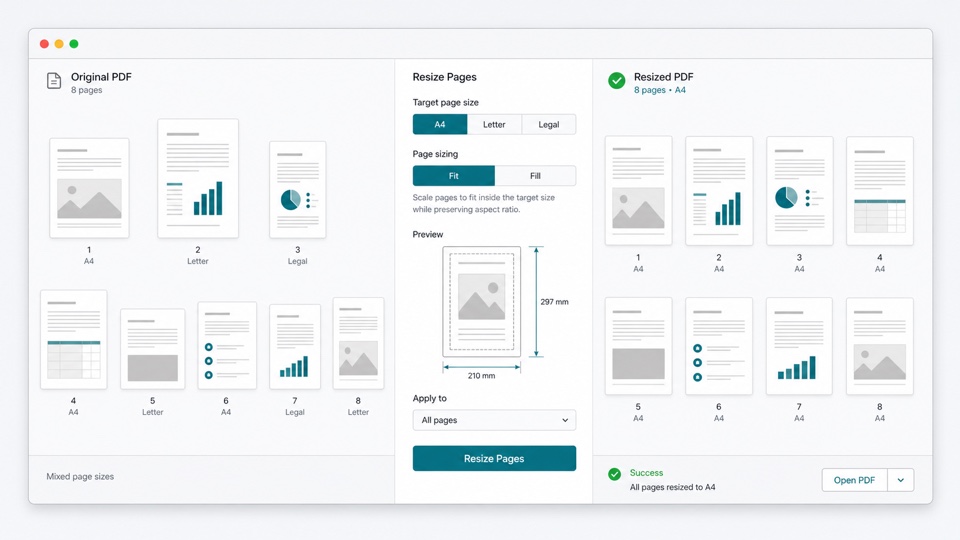
Choose a target page size and decide whether content should fit inside or fill every page.

Drop PDF files here

Your files stay in this browser. Nothing is uploaded to a server.

Standardize PDF page dimensions without uploading

PDFs assembled from scans, exports, and multiple documents can contain pages with inconsistent dimensions. Resizing creates a uniform document that is easier to print and share.

Choose A4, Letter, or Legal size. Fit mode keeps all content visible, while Fill mode covers the entire target page and may crop the edges.

The transformation runs locally and embeds each original page as vector content, preserving searchable text whenever it exists in the source PDF.

How resizing preserves quality

Vector page embedding

Original pages are embedded and scaled without rendering the entire document as images.

Fit or Fill control

Choose complete visibility with margins or edge-to-edge coverage with possible cropping.

Consistent output size

Every output page uses the selected standard dimensions.

How it works

1

Choose a PDF

Open the document locally and preview its pages.

2

Choose size and scaling

Select A4, Letter, or Legal, then choose Fit or Fill.

3

Download the resized PDF

Create a new PDF with uniform page dimensions.

Questions

Can I resize a PDF without uploading it?+

Yes. Page resizing happens locally in your browser.

What is the difference between Fit and Fill?+

Fit keeps all original content visible and may add margins. Fill covers the target page but may crop content near the edges.

Which page sizes are supported?+

The tool currently supports A4, US Letter, and US Legal page sizes.

Will text remain searchable?+

Yes, when the source text is searchable. Pages are embedded as PDF content instead of being rasterized.

Does resizing change the original PDF?+

No. A new resized PDF is created and the original file remains unchanged.